Read and Count | Free app to learn to read and write
Learn to read and write at home with Read and Count.
Anúncios
A free adult literacy app with simple lessons on letters, syllables, numbers, shapes, and more.
Anúncios
Start today on your phone and study at your own pace.
Discover the Read and Count app
Read and Count is an educational app created to help in the first stages of learning.
It focuses on basic reading, writing and math skills, using images, sounds and interactive activities to make learning more intuitive and playful.
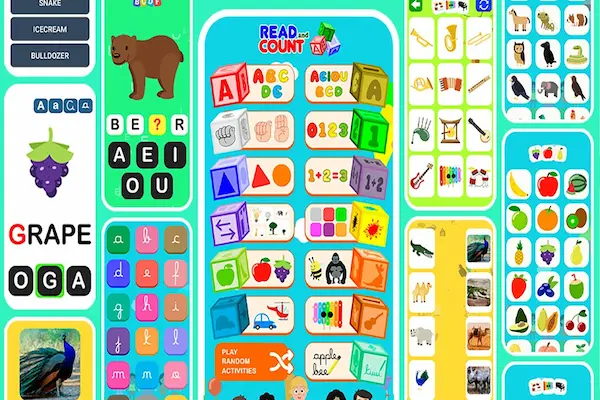
The app brings several content areas in one place.
Inside Read and Count, you can find:
- Alphabet from A to Z, with letters in upper and lower case and exercises to recognize, order and write each letter.
- Vowels and consonants, with activities to separate groups and understand where each letter is used in words.
- Numbers from 0 to 100, with exercises to write numbers, count objects and organize sequences.
- Simple addition and subtraction, always in a visual and concrete way, ideal for beginners.
- Colors, shapes, animals, fruits, musical instruments, means of transport, flags and more, helping to expand vocabulary while training reading and listening.
- A section with many words for the learner to practice reading and writing.
Another important point is that Read and Count is available in more than one language (for example, English, Portuguese and Spanish in many versions), which allows you to learn in your main language or even use the app to reinforce a second language.
Although it was originally designed with children in preschool age in mind, its simple and visual structure also helps teenagers and adults who are beginning the literacy process and feel more comfortable starting with images, sounds and very concrete activities.
How to download the Read and Count app
Before anything else, it’s important to say that you should always download Read and Count from official and trusted stores to protect your device and your data.
The app is usually free and can be found in the main mobile app stores, such as Android and iOS.
1. Download Read and Count on Android
Open the app store on your Android phone or tablet.
In the search bar, type “Read and Count” or, depending on your region, “Ler e Contar”.
Check if the name and icon match the educational app you are looking for and read the description carefully.
Confirm that you are on the official app page, check the screenshots and comments from other users.
Click Install and wait for the download and installation to finish.
Once it’s done, tap Open or find Read and Count on your home screen to start using it.
You’ll see menus such as Alphabet, Numbers, Animals, Fruits, Shapes and several other categories.
2. Download Read and Count on iOS (iPhone and iPad)
Open the App Store on your iPhone or iPad.
Search for “Read and Count” in the search field.
Find the app with educational focus on alphabet, numbers and basic vocabulary.
Tap Get (or the cloud icon) to download the app.
Authenticate with Face ID, Touch ID or password if necessary.
After installing, open the app and choose the language you prefer if the app offers this option.
Important: Although the app may appear on other download sites and APK directories, the safest option is to use the official stores whenever possible.
Main features of Read and Count
The big advantage of Read and Count is that it combines reading, writing and math in a single environment, using visual and auditory reinforcement.
Below you’ll see the main features and how each one can help in literacy for children and adults.
Alphabet and first steps in reading
In the Alphabet section, the learner sees the complete alphabet, letter by letter, with illustrations and activities.
The app usually allows you to:
- Listen to how each letter is pronounced.
- See words that begin with that letter, with images that make understanding easier.
- Practice writing the letters on the screen, training the movement and the shape of each one.
- Organize letters in alphabetical order or recognize the correct letter in simple games.
For adults who are starting from zero, these activities work as a visual alphabet notebook, but in digital form, with sound and repetition.
Vowels, consonants and syllables
Another important feature of Read and Count is the focus on vowels and consonants, which helps to understand the structure of words.
There are activities to:
- Separate vowels and consonants.
- Identify which group each letter belongs to.
- Practice where to use each letter in simple words.
This makes it easier to advance later to syllables and word formation, even if the person has never had much contact with formal study.
Numbers and basic math in Read and Count
In the Numbers area, the app works numbers from basic levels, such as 0 to 100, with activities like:
- Writing numbers on the screen.
- Counting objects.
- Organizing numbers in sequence.
- Simple addition and subtraction, often with visual supports.
For those who had little contact with school, these activities help to create number sense, recognizing quantities and basic operations without pressure or complex terminology.
Colors, shapes and everyday vocabulary
Read and Count also uses themes that are part of everyday life to teach new words and reinforce reading.
The app often includes categories such as:
- Colors, with examples of objects and sometimes even color combinations.
- Geometric shapes, like circle, square and triangle, with drawings and examples.
- Animals, with names and illustrations and sometimes sounds.
- Fruits, with drawings and activities to match image and name.
- Musical instruments, with images and audios of each instrument when available.
- Means of transport and flags of countries, expanding general knowledge and vocabulary.
All of this is useful not only for children, but also for adults who are learning to read and want to connect the written word with the object they already know in real life.
Words, opposites and sign language
The app goes beyond isolated letters and numbers.
In Read and Count, you may also find:
- A menu with several everyday words to read and write, plus small quizzes to test recognition.
- A module of opposite words (big/small, full/empty, etc.), which enriches vocabulary and understanding.
- A section with the alphabet in sign language, in some versions, helping to recognize signs and letters.
For adult learners, this can be a way to connect literacy with inclusion and access to new forms of communication.
Random activities and dynamic practice
To avoid repetition, Read and Count often offers a random activities option, which mixes exercises from different categories.
This helps to:
- Review content in a more natural and varied way.
- Keep attention and curiosity high, especially for those who get bored easily.
How to use Read and Count at home
Having a good app is only half of the equation.
The other half is how you use it at home.
Below are some practical ways to make Read and Count part of a healthy and effective learning routine.
Create a simple and fixed routine
Choose a time of day when the person is usually more calm and focused.
For children, it could be after a snack or before bedtime.
For adults, it could be after work, at night, or early in the morning.
Start with 10 to 20 minutes a day, and increase the time only if the person feels willing and motivated.
Consistency is more important than doing everything at once.
Combine the app with real-world objects
While the learner is using the Alphabet module, you can go around the house looking for objects that start with the same letter.
If you’re in the Numbers section, you can count plates, steps on the stairs or fruits in a bowl.
In the Colors module, you can ask the person to find objects of the color that appears in the app.
Connecting the digital to the real makes learning more meaningful and easier to remember.
Encourage the person to “teach back”
After a session with Read and Count, ask the learner to explain to you what they saw.
Let them show the letters they practiced, the numbers they learned or the animals they discovered.
This “teach back” technique strengthens memory and increases confidence, whether with a child or an adult.
Use headphones when possible
If the environment is noisy, using headphones can help the person focus on the app’s sounds, especially in activities that involve pronunciation and listening.
For adults who are shy or afraid of making mistakes, headphones also give more privacy to repeat sounds calmly.
30-day plan to learn with Read and Count
Now that you know what the app offers, let’s turn it into a practical 30-day plan.
This plan can be used with children, teenagers or adults who are starting literacy from the basics.
The idea is not to “rush” learning, but to organize the journey in a clear and motivating way.
Week 1 (Days 1 to 7) – Getting familiar with letters and numbers
Goal of the week: explore the app, get to know the alphabet and the first numbers.
- Day 1 and 2 – Exploring the Alphabet
Use Read and Count only in the Alphabet section.
Let the person tap letters freely, listen to the sounds and see the images.
Ask which letters they liked the most or recognized from their name.
- Day 3 and 4 – Vowels focus
Work specifically on the vowels (A, E, I, O, U) using the activities to recognize and separate them.
Outside the app, write the vowels on paper and ask the learner to trace them with pencil or finger.
- Day 5 and 6 – First numbers
Enter the Numbers section and focus on numbers from 0 to 10.
Count objects at home while the app reinforces the shape and the name of each number.
- Day 7 – Review with random activities
Use the random activities option to mix alphabet and numbers in a lighter way.
Ask the learner what they found easiest and hardest to help plan the next weeks.
Week 2 (Days 8 to 14) – Strengthening reading and basic math
Goal of the week: reinforce letter recognition and take first steps in addition and subtraction.
- Day 8 and 9 – Consonants and word beginnings
Work on consonants and exercises of “what letter does this word start with?”.
Use everyday words (name of the person, relatives, places at home) to connect with real life.
- Day 10 and 11 – Simple addition
In the Numbers and basic math area, practice very simple operations, preferably with visual supports.
For example, show 2 fruits plus 1 fruit and let the person count on fingers and in the app.
- Day 12 and 13 – Colors and shapes
Use the Colors and Geometric shapes sections to expand vocabulary while reading simple words.
Ask the learner to find objects of that color or shape around the house.
- Day 14 – General review
Use random activities or go back to the modules where the person had more difficulty.
Celebrate the progress, even if it seems small.
Week 3 (Days 15 to 21) – Vocabulary and understanding
Goal of the week: increase the number of words recognized and improve reading comprehension.
- Day 15 and 16 – Animals and fruits
Explore the Animals and Fruits modules, paying attention to names, images and sounds if available.
Ask the learner to repeat the names and try to recognize the written word on the screen.
- Day 17 and 18 – Words menu
Go to the Words section or activities that focus on vocabulary and choose a small group (for example, 5 to 10 words) to work on.
Use paper or a notebook to copy these words by hand.
- Day 19 and 20 – Opposites
Use the opposites module to learn pairs such as big/small, full/empty, open/closed.
Ask the learner to give examples at home, like a full glass and an empty glass.
- Day 21 – Story day
Choose some words learned during the week and create a small story together, even if very simple.
You can use the app as inspiration for characters or objects.
Week 4 (Days 22 to 30) – Autonomy and consolidation
Goal of the week: make the learner more independent and consolidate what has been practiced.
- Day 22 and 23 – Guided free choice
Let the person choose the module in Read and Count, but ask them to explain why they chose it and what they want to practice.
Stay close, but give more autonomy.
- Day 24 and 25 – Focus on weaknesses
Return to the activities that are still difficult (it could be numbers, some letters or reading certain words).
Use repetition without pressure, always reinforcing the progress made so far.
- Day 26 and 27 – Sign language (optional but enriching)
If your version of the app has a sign language alphabet, explore this section to broaden awareness about communication and inclusion.
Even if literacy is the main goal, this module can be inspiring and motivating.
- Day 28 and 29 – Mixed review
Alternate between Alphabet, Numbers, Words and one theme module (Animals, Fruits, Colors, etc.).
Try to keep the rhythm, but in a lighter and more playful way.
- Day 30 – Evaluation and celebration
Ask the learner to show everything they already know inside the app and, if possible, on paper.
Celebrate the journey of the 30 days and decide together what the next objective will be.
Tips to succeed with the free adult literacy app
Even though Read and Count has been designed especially for children, its structure can help a lot in adult literacy, especially for those who:
- Did not complete primary school.
- Feel ashamed of going back to the classroom.
- Learn better with images, audio and repetition.
Here are some tips to adapt the app to adult reality.
Respect the adult’s pace and privacy
Many adults carry emotional scars related to school.
Avoid comparing their pace with that of children or other people.
If possible, let them use Read and Count in a quiet and private place, so they don’t feel judged for making mistakes.
Use real-life words and contexts
Whenever you learn a new word in the app, try to connect it with:
- The person’s work (tools, tasks, places).
- Everyday life (bus, market, medicine labels).
- Names of relatives and important people.
The more useful and familiar the word is, the greater the motivation to continue learning.
Combine digital learning with paper and pen
Copying letters and words by hand helps to fix learning and trains motor coordination.
After using Read and Count, ask the adult learner to:
- Rewrite the words they saw that day.
- Circle letters they still confuse.
- Create small lists (shopping, tasks, objects at home).
Set small and achievable goals
Instead of “I want to learn to read”, define goals like:
- Recognize and write all vowels.
- Read numbers from 0 to 20.
- Read and write the names of family members.
Every time a goal is achieved, reinforce the victory and set the next step together.
Read and Count vs other tools
When we talk about literacy and early learning, there are several apps and platforms available.
Some apps focus more on the alphabet.
Others work mainly with syllables, and others concentrate on stories and reading comprehension.
There are also subscription platforms that offer many mini games and a complete learning environment for reading and counting, usually with a monthly or annual fee.
So how does Read and Count position itself among these options?
Advantages of Read and Count
- It is generally free, depending on the store and region.
- It combines letters, numbers, vocabulary, colors, shapes, animals, fruits, opposites and more in a single app, which reduces the need to install many different tools.
- It often offers content in more than one language, which is useful for multilingual families and for those who want to reinforce a second language.
- It has graphics and interactions designed for beginners, making it accessible both for children and adults starting from basic levels.
Points to complement with other tools
No app alone takes care of all aspects of literacy and education.
You can complement Read and Count with:
- Printed materials, such as notebooks, alphabet cards and simple storybooks.
- Other apps focused on sentences and more advanced reading, when the learner is ready.
- Real-world experiences, such as reading signs in the street, labels in the market, bus lines and information boards.
The secret is to see Read and Count as a strong base for the first steps, which can be enriched with other tools and everyday practice.
Start now!
You don’t need a perfect plan, expensive materials or a super powerful device to start the literacy journey.
With a simple smartphone, a bit of daily time and the Read and Count app, it’s already possible to open important doors for children, teenagers and adults who want – or need – to learn to read, write and count.
Choose one device, define a time of day and follow the 30-day plan as a guide, adapting it to your reality.
Take advantage of the visual, playful and multilingual structure of Read and Count to transform learning into something lighter and less scary.
Every letter recognized, every word read and every number understood is a step towards more autonomy, more opportunities and more confidence.
Start today with the time and resources you have.
The important thing is not perfection.
The important thing is the next small step.