Blood sugar monitor phone | Top 5 free apps
If you’ve ever wished your phone could become a simpler place to organize blood sugar notes, you’re not alone.
Advertisements
The right free app can turn scattered readings and habits into a clear routine you can review and share with your clinician.
Advertisements
Top 5 free apps for a blood sugar monitor phone
The apps below are real options that are commonly used for logging or device-connected glucose tracking.
Most offer a free download and a free tier, with optional paid upgrades or add-ons depending on your location and preferences.
Availability, features, and pricing can change over time, so always review the current app listing and privacy details before committing.
1) mySugr
mySugr is a popular diabetes logbook app designed to make daily tracking feel less overwhelming.
It focuses on quick entries, clear summaries, and a friendly interface that many people find easier to stick with.
It can also support sharing information with your care team, depending on how you use it and what features are available in your region.
- Best for: People who want a clean logbook experience that encourages consistency.
- Nice to have: Visual summaries that help you review your week before an appointment.
- Keep in mind: Some advanced features may sit behind optional upgrades.
If you want your phone to be a steady hub for your routine, mySugr is often a strong starting point.
Just keep your expectations realistic, because it organizes data, but it does not replace clinical guidance.
2) Glucose Buddy
Glucose Buddy is a long-running option for logging glucose readings and related daily details.
It’s built around the idea that simple logs become more useful when you can add lifestyle context next to the numbers.
Many users like it as a general-purpose tracker that doesn’t force a complicated setup on day one.
- Best for: People who want to log glucose alongside food, activity, and routine notes.
- Nice to have: A straightforward format that can be easier for beginners.
- Keep in mind: Some features may be presented as optional premium upgrades.
If your biggest challenge is remembering what happened around a reading, this style of app can help you capture the “why” quickly.
Over time, those notes can make conversations with a clinician more productive.
3) Diabetes:M
Diabetes:M is a robust tracker that often appeals to people who like deeper logs and more structured reports.
It can be useful if you enjoy seeing your information organized in multiple views and summaries.
It may feel like “a lot” at first, but it can become powerful once you settle into a routine.
- Best for: People who want more detailed reports and a structured tracking approach.
- Nice to have: Reporting options that can help you prepare for appointments.
- Keep in mind: Some advanced tools may require add-ons or paid options.
If you like detail and you’re motivated by seeing your logs in multiple formats, Diabetes:M can be a strong free starting point.
Start simple, and only add extra fields if they genuinely help you stay consistent.
4) Apple Health (Health app on iPhone)
If you use an iPhone, Apple Health can act as a central place to store health data, including blood glucose entries.
You can add information manually, and many compatible apps and devices can also send data into Apple Health.
This can be especially helpful if you want one place to view multiple health signals alongside glucose-related notes.
- Best for: iPhone users who want a built-in, system-level hub for health records.
- Nice to have: A centralized approach that can reduce app switching.
- Keep in mind: Exact syncing depends on device and app compatibility.
Apple Health is not a glucose device, but it can help you keep your information organized and easier to share in context.
Always confirm what is being logged and where it is coming from, especially if multiple apps are involved.
5) FreeStyle LibreLink
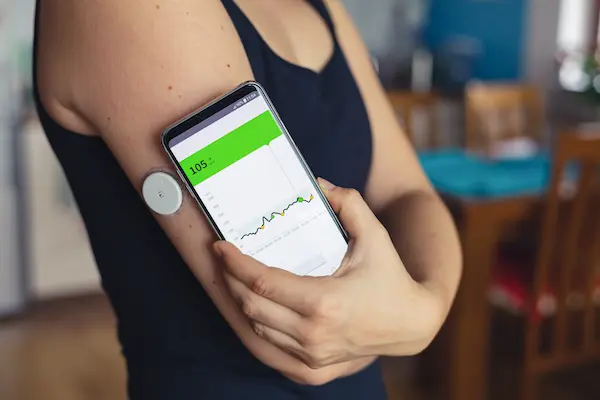
FreeStyle LibreLink is a companion app designed to work with FreeStyle Libre sensors in supported regions.
When used with the appropriate sensor and care guidance, it can display glucose information on your phone and store history.
This is a good example of a true “phone as a hub” approach, where the phone displays data that comes from an approved medical device.
- Best for: People already using the FreeStyle Libre system who want phone-based viewing.
- Nice to have: Quick access to history and trends provided by the sensor ecosystem.
- Keep in mind: It requires compatible sensors and availability varies by country.
If you use a CGM ecosystem, the manufacturer’s app is often the most direct way to view and organize that device’s data on your phone.
For safety, always follow the device instructions and your clinician’s guidance for how to respond to readings.
Blood sugar monitor phone: what it really means
When people say “blood sugar monitor phone,” they usually mean a phone that helps you track and review glucose-related information in one place.
Your phone is not a medical sensor by itself, and it cannot replace a traditional blood glucose meter or a continuous glucose monitor.
Instead, the app becomes a practical dashboard for storing readings, spotting patterns, and preparing better questions for medical appointments.
That difference matters, because accurate readings still come from approved devices, lab work, and professional guidance.
Phone apps support your routine, not your diagnosis
A tracking app can help you log numbers you get from a fingerstick meter, a CGM, or lab results shared by your healthcare team.
It can also help you add context, like meals, activity, stress, sleep, and medication timing.
This context is often what turns “a bunch of numbers” into a story your clinician can actually use.
If you ever feel unwell, or you suspect your glucose is outside your safe range, follow your care plan and seek medical help right away.
Who a “blood sugar monitor phone” setup can help most
It can be useful for people with diabetes, people with prediabetes, and people who are simply trying to understand how daily habits affect energy and wellbeing.
It can also help caregivers who support a family member, as long as sharing is done with permission and privacy in mind.
And it can help anyone who wants faster access to their own history when a clinician asks, “What have your readings been like lately?”
What a blood sugar monitor phone app can do for you
Free apps vary a lot, but the best ones usually focus on making your day-to-day tracking easier and more consistent.
Consistency is the real win, because it’s hard to learn from data that only shows up once in a while.
Features that actually matter day to day
- Simple logging for glucose readings from your meter or CGM.
- Trends and charts that help you notice patterns over time.
- Notes for meals, exercise, sleep, stress, and medication timing.
- Reminders for check-ins, refills, or routines you want to maintain.
- Export options so you can share information with your clinician.
- Device syncing when you use a compatible meter or CGM ecosystem.
The goal is not to make you obsess over every single number.
The goal is to make it easier to spot repeat situations that you can discuss with a professional and respond to with a plan.
A quick safety reminder before you pick any app
Apps are tools for tracking, not a substitute for medical care, lab testing, or professional advice.
Always use medically approved devices and methods for obtaining readings, and talk with your clinician about what your numbers mean for you.
If an app makes bold promises, claims to replace clinical methods, or pushes extreme advice, that’s a sign to walk away.
How to choose a Blood sugar monitor phone app that fits your life
The “best” app is the one you will actually use without feeling stressed or overwhelmed.
That usually comes down to simplicity, trust, and how well the app fits your daily routine.
Use these practical selection checks
- Logging speed: Can you enter a reading in a few taps without friction?
- Context: Can you add notes for meals, activity, sleep, stress, and medication timing?
- Trends: Does it show weekly or monthly views that help you spot patterns?
- Exporting: Can you create a shareable summary for your clinician?
- Compatibility: If you use a device ecosystem, does syncing work reliably?
- Privacy: Is it clear how your data is stored, shared, or used for ads?
- Cost clarity: Are optional upgrades explained without tricks or confusing prompts?
If an app feels complicated on day one, it will probably feel impossible on a busy week.
Pick the simplest option that still gives you the insights you need.
One simple question that saves time
Ask yourself, “What do I want to do with this data at my next appointment?”
If the answer is “show trends and routines,” then prioritize exporting and easy charts.
If the answer is “remember what happened around certain days,” then prioritize quick notes and reminders.
Blood sugar monitor phone setup in 10 minutes
You don’t need a perfect system on day one.
You need a system that is easy enough to keep going.
- Pick one app from the list and commit to using it for two weeks.
- Set your units correctly, so you don’t mix mg/dL and mmol/L.
- Decide your “minimum log,” like one morning entry and one evening entry, if that matches your care plan.
- Add one context note per day, like a meal, a workout, or a stressful event.
- Once per week, review your trends for five minutes without judgment.
- Write down two questions you want to bring to your clinician or diabetes educator.
- If you use a CGM or a compatible meter, check syncing carefully and confirm the data looks right.
This approach keeps you focused on consistency rather than perfection.
And it keeps the app in its proper role, which is organizing information for easier decision-making with professional input.
Common mistakes that reduce the value of your logs
Most tracking problems are not about effort.
They’re about small setup issues that quietly break the usefulness of the data.
Mistake 1: Logging numbers without context
A number alone is often less helpful than a number with a quick note.
Even a short note like “late dinner” or “poor sleep” can make trends easier to understand later.
Mistake 2: Overreacting to a single reading
One reading can be influenced by many factors, including timing, food, stress, and activity.
Trends over time are usually more useful for discussions with a clinician than one isolated moment.
Mistake 3: Forgetting to confirm units
Mixing mg/dL and mmol/L can create confusion and can make charts look alarming for no real reason.
Check your units during setup, and double-check them after updates or phone changes.
Mistake 4: Treating the app like a replacement for medical care
Apps help you track and organize information.
They do not replace medical devices, lab work, or professional guidance.
If something feels off, follow your care plan and seek help from a licensed professional.
Privacy and security checklist for health tracking apps
Health data is personal, and it deserves extra caution.
Before you commit, take two minutes to scan the app’s privacy details and settings.
- Use a strong passcode on your phone and enable biometric lock if available.
- Turn on app lock features if the app offers them.
- Review sharing permissions, especially if you connect multiple apps together.
- Be cautious with apps that rely heavily on ad tracking or unclear data sharing.
- Export and store your summaries securely if you save them outside the app.
If privacy language feels vague, consider a more reputable alternative or a device ecosystem app tied to approved hardware.
Your comfort and trust matter as much as the feature list.
FAQ: Blood sugar monitor phone apps
Can a phone app check blood sugar without any device?
In general, accurate glucose readings come from approved medical devices or lab methods, not from a phone alone.
A phone app is best used as a tracker and organizer for data you obtain through appropriate methods.
Are free apps “good enough” for most people?
Many free tiers are enough for basic logging, trends, and simple sharing.
If you later want more advanced reports or coaching features, you can evaluate paid options with your clinician’s input.
Which is better, a general logbook app or a device companion app?
A general logbook app is flexible if you want to type in readings and notes from different sources.
A device companion app can be smoother if you already use a specific meter or CGM ecosystem and want reliable syncing.
What should I bring to my appointment from the app?
Bring a weekly or monthly trend summary, plus notes about meals, routines, sleep, stress, and medication timing if you track those.
Two or three clear questions often help more than pages of raw logs.
Is it safe to share my logs with family or friends?
Sharing can be helpful if it supports your routine and you feel comfortable.
Use built-in sharing options when possible, and avoid posting personal readings publicly.
Make your phone a calmer health hub
A “blood sugar monitor phone” setup is really about convenience, clarity, and consistency.
It helps you track readings and habits in a way that’s faster to review and easier to share with your clinician.
Pick one app, keep your routine simple, and focus on learning from trends rather than chasing perfection.
And whenever you’re unsure about what your numbers mean, let a qualified healthcare professional guide the next step.